
In some deployment scenarios, the TRIAX TOLT management IP address responds to ping, but the Web GUI cannot be accessed through a browser.
Issue Description
TOLT management IP is reachable (ping is successful)
Web interface does not open
Login page is not displayed when entering only the IP address
Affected Product
TOLT – 4422 & 8422
Root Cause
The TOLT Web GUI supports secure HTTPS access only.
If the IP address is entered without the protocol, the browser will attempt HTTP by default, which prevents the login page from loading.
Solution
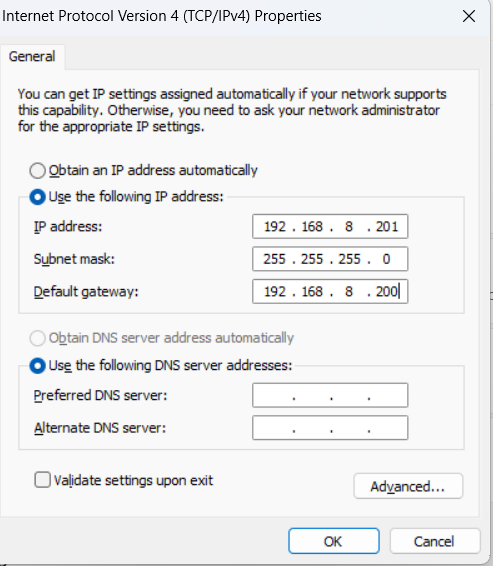
✅ Step 1 – Verify PC IPv4 Configuration
Ensure that the PC is in the same subnet as the TOLT management IP.
✅ Step 2 – Use the Full HTTPS URL (Mandatory)
Enter the complete address in the browser:
✅ Step 3 – Try Different Web Browsers
Access the TOLT using:
Google Chrome
Microsoft Edge
Mozilla Firefox
You may receive a security warning due to the self-signed certificate — this is expected.
Proceed to the webpage.